
YouTube Create 2026: Mobile Se Professional Video Editing Kaise Kare?
YouTube Create 2026 se mobile par professional videos kaise edit karein? Video editing, Shorts, captions, audio aur useful tips ki complete guide jaaniye.
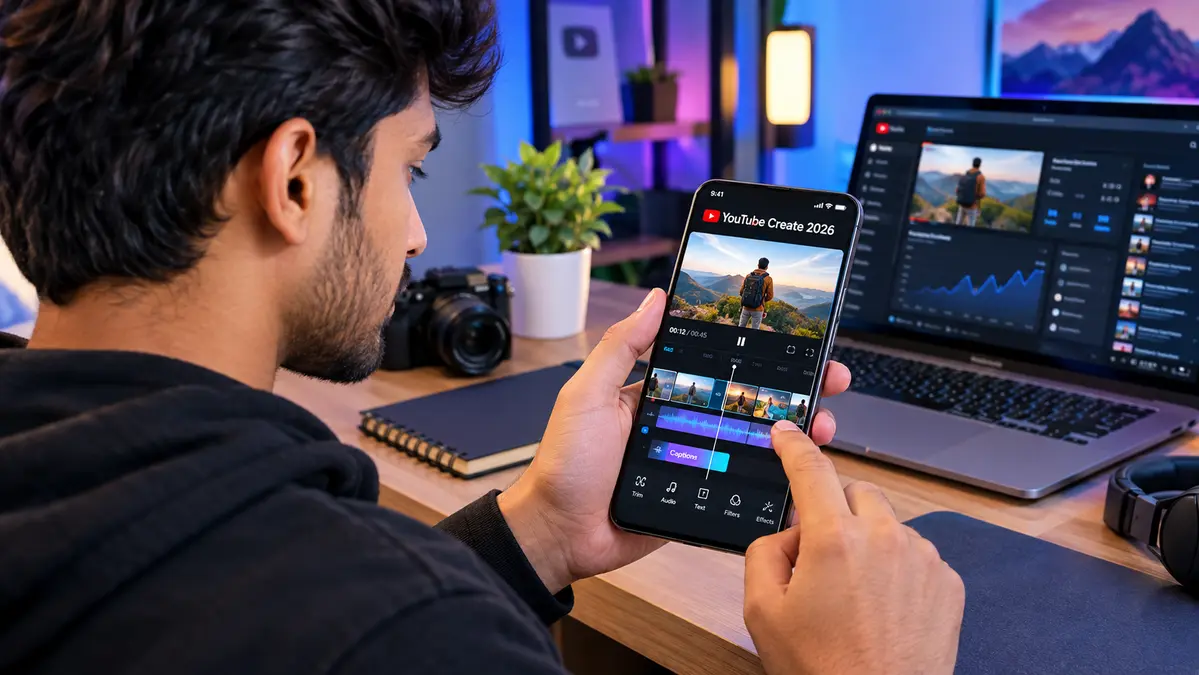
Aaj ke time mein YouTube par content create karne ke liye expensive PC ya complicated video editing software hona zaroori nahi hai. Agar aap smartphone se videos, Shorts, vlogs ya social media content banana chahte hain, to mobile video editing apps kaafi useful ho sakte hain. Isi category mein YouTube Create 2026 creators ke liye ek interesting option hai.
YouTube Create ka main idea simple hai: creators ko smartphone par hi video edit karne ke liye ek relatively easy workflow provide karna. Isme video clips ko trim karna, music add karna, transitions aur effects use karna, captions lagana aur content ko YouTube ke liye prepare karna jaise kaam kiye ja sakte hain.
Is guide mein hum samjhenge ki YouTube Create 2026 kya hai, mobile par isse professional-looking video kaise edit ki ja sakti hai, beginners ko kaunse features use karne chahiye aur video editing ke dauran kin mistakes se bachna chahiye.
YouTube Create 2026 Kya Hai?
YouTube Create 2026 ko simple language mein YouTube ecosystem ke liye designed mobile video editing solution ke roop mein samjha ja sakta hai. Iska focus un creators par hai jo smartphone se video content create aur edit karna chahte hain.
Traditional desktop editing software mein beginners ko bahut saare tools aur complicated timelines dekhne ko milte hain. Mobile-focused editing workflow ka advantage ye hai ki basic editing tasks relatively simple interface mein complete kiye ja sakte hain.
Ek beginner apne phone se recorded clips ko arrange karke unwanted portions remove kar sakta hai, audio improve kar sakta hai, text ya captions add kar sakta hai aur final video ko YouTube content ke liye prepare kar sakta hai.
👉🏻YouTube AI Features 2026: Creators Ke Liye Kaunse Tools Useful Hain?
👉🏻Gemini Notebook Ke New AI Features: Students Ke Liye Kya-Kya Badla?
👉🏻Gemini 3.8 Live Kya Hai? AI Voice Chat Me Kya Badalne Wala Hai
YouTube Create 2026 Mein Video Editing Kaise Start Kare?
Agar aap mobile se editing start kar rahe hain, to sabse pehle apne raw video clips ko organize karna useful rahega. Ek project mein unnecessarily bahut saare random clips import karne se editing confusing ho sakti hai.
1. Raw Video Clips Select Karein
Sabse pehle apne phone mein available video clips ko dekhein aur sirf useful footage select karein. Agar aap vlog bana rahe hain, to introduction, main content, B-roll aur ending ke clips ko alag identify karna helpful ho sakta hai.
Short-form content ke liye unnecessary pauses aur repetitive footage ko starting mein hi remove karna editing ko faster bana sakta hai.
2. Clips Ko Timeline Mein Arrange Karein
Editing ka next step clips ko correct order mein arrange karna hai. Ek professional video ka basic structure kuch is tarah ho sakta hai:
- Strong opening ya hook
- Main information ya story
- Supporting visuals
- Important takeaway
- Short ending ya call-to-action
YouTube Create 2026 jaise mobile editing workflow mein bhi sequence important hai, kyunki achhi footage ke bawajood poor ordering video ko boring bana sakti hai.
Professional Video Editing Ke Liye Trim Aur Cut Kaise Karein?
Professional-looking video ka sabse important part fancy effects nahi, balki clean editing hai. Agar video mein long pauses, unnecessary words ya repeated scenes hain, to viewer ka interest kam ho sakta hai.
Isliye har clip ko carefully review karein aur unnecessary portions remove karein. Dialogue ke beech ke extremely long pauses ko shorten kiya ja sakta hai. Vlog mein repetitive walking footage ko bhi reduce kiya ja sakta hai.
Ek simple rule follow karein: jo part story ya information ko improve nahi karta, usse remove karne par consider karein.
YouTube Create 2026 Mein Music Aur Audio Kaise Improve Karein?
Video ki quality sirf visuals se decide nahi hoti. Poor audio ke saath high-quality video bhi amateur lag sakta hai. Isliye editing ke time voice aur background music ke balance par attention dena important hai.
Agar aap talking-head video bana rahe hain, to voice ko clearly audible rakhna priority honi chahiye. Background music ko itna loud nahi rakhna chahiye ki narration samajhna difficult ho jaye.
Music ka selection bhi video ke mood ke according hona chahiye. Educational video ke liye subtle background music aur energetic Shorts ke liye faster music suitable ho sakta hai.
Captions Aur Text Ka Use Kyun Important Hai?
Mobile users kai baar videos ko low volume ya muted mode mein dekhte hain. Isi wajah se captions aur on-screen text short-form content mein particularly useful ho sakte hain.
YouTube Create 2026 workflow mein captions ka use karte waqt readability ko priority dein. Bahut small text, complicated fonts ya excessive animations avoid karein.
Important points ko short text overlays ke through highlight kiya ja sakta hai. Example:
- 3 Important Tips
- Step 1
- Common Mistake
- Final Result
Text ka purpose viewer ko information samajhne mein help karna hona chahiye, na ki screen ko unnecessarily fill karna.
YouTube Create 2026 Se Shorts Kaise Edit Karein?
YouTube Shorts ke liye vertical video format generally important hota hai. Agar aap Shorts bana rahe hain, to recording aur editing ke time vertical composition ko dhyan mein rakhna useful hai.
Shorts editing ke liye ek simple structure follow kiya ja sakta hai:
- First few seconds mein strong hook.
- Fast aur relevant cuts.
- Important information ke liye captions.
- Unnecessary pauses ko remove karna.
- End mein clear takeaway.
Short video ka objective sirf video ko chhota banana nahi hai. Viewer ko limited time mein clear value dena bhi important hai.
YouTube Create 2026 Se Long YouTube Videos Edit Karna
Long-form videos ke liye editing approach Shorts se different ho sakti hai. Yahan pacing, storytelling, B-roll aur audio continuity ka role zyada hota hai.
For example, agar aap technology tutorial bana rahe hain, to sirf talking-head footage use karne ke bajay screen recordings, product shots aur relevant visuals add karna video ko easier to follow bana sakta hai.
Vlogging mein location shots, reaction clips aur short B-roll segments story ko visually interesting bana sakte hain.
👉🏻Instagram Account Secure Kaise Kare? Important Security Settings
👉🏻Low Traffic Blog Se Paise Kaise Kamaye? 2026 Mein Kam Visitors Se Earning Kaise Start Karein
👉🏻AI Video Generation 2026: Text Se Realistic Videos Kaise Ban Rahe Hain?
Mobile Se Professional-Looking Video Banane Ke 7 Tips
1. Pehle Script Ya Outline Banayein
Recording start karne se pehle basic outline bana lena editing time ko reduce kar sakta hai. Aapko pata rahega ki video mein kya bolna hai aur kaunse visuals chahiye.
2. Good Lighting Use Karein
Expensive camera se zyada important kai situations mein lighting ho sakti hai. Natural window light ya simple continuous light se subject ko clearly illuminate kiya ja sakta hai.
3. Audio Ko Priority Dein
Phone ko subject ke relatively close rakhna ya suitable microphone use karna voice clarity improve kar sakta hai.
4. Excessive Transitions Avoid Karein
Har clip ke beech fancy transition lagana professional editing nahi hoti. Simple cuts kai videos mein zyada natural lagte hain.
5. Consistent Text Style Rakhein
Video mein fonts aur text placement ko consistent rakhne se overall presentation cleaner feel ho sakti hai.
6. B-Roll Add Karein
B-roll main narration ko support karne wale additional visuals hote hain. Example ke liye, agar aap smartphone ke camera ke baare mein baat kar rahe hain, to phone ke close-up shots useful B-roll ho sakte hain.
7. Export Se Pehle Full Video Check Karein
Final export se pehle poori video ek baar dekhein. Audio sync, spelling, unwanted black frames, awkward cuts aur background noise jaise issues identify karna easy ho jayega.
YouTube Create 2026 vs Advanced Desktop Editing
Mobile editing tools ka purpose har professional editing requirement ko replace karna zaroori nahi hai. Basic YouTube videos, Shorts, vlogs aur social content ke liye mobile workflow convenient ho sakta hai.
Wahin advanced projects mein multi-camera editing, complex color grading, sophisticated audio mixing, advanced motion graphics aur large production workflows ke liye desktop software more suitable ho sakta hai.
Isliye tool choose karte waqt apne project ki requirement ko dekhna better hai. Beginner creator ke liye simple workflow productivity improve kar sakta hai.
YouTube Create 2026 Kin Creators Ke Liye Useful Ho Sakta Hai?
Ye type ka mobile editing workflow especially un users ke liye useful ho sakta hai jo:
- Mobile se YouTube videos banana chahte hain.
- Shorts regularly create karte hain.
- Vlogging start kar rahe hain.
- Basic educational videos edit karna chahte hain.
- Social media content create karte hain.
- Complex desktop software se beginner level par uncomfortable hain.
Beginners Ki Common Video Editing Mistakes
New creators aksar editing mein effects aur transitions par bahut focus karte hain. Lekin video ki quality improve karne ke liye basic elements pehle important hote hain.
- Bahut long introduction rakhna.
- Background music ko excessively loud karna.
- Har scene par transition lagana.
- Small aur difficult-to-read text use karna.
- Unnecessary footage retain karna.
- Audio quality ko ignore karna.
- Video ka purpose clear na hona.
Simple, clean aur purposeful editing generally viewer experience ko improve karne mein help karti hai.
Kya YouTube Create Beginners Ke Liye Easy Hai?
Mobile video editing mein beginners ke liye sabse important factor interface ki simplicity hoti hai. Agar aap pehli baar editing kar rahe hain, to initially sirf trim, cut, audio, text aur captions jaise basic tools se start karein.
Ek hi project mein har available feature try karne ki zaroorat nahi hai. Pehle basic workflow samjhein, phir gradually advanced editing techniques experiment karein.
YouTube Create 2026 Se Content Creation Ka Future
Smartphone cameras improve hone ke saath mobile content creation bhi increasingly accessible ho raha hai. Creators ko recording, editing aur publishing ke liye powerful desktop setup ki dependency har project mein zaroori nahi reh gayi hai.
YouTube Create 2026 jaise tools ka main advantage convenience ho sakta hai. Creator idea ko record karke relatively quickly edit kar sakta hai aur publishing workflow ke saath connect kar sakta hai.
Lekin successful YouTube channel sirf editing app se nahi banta. Topic selection, original content, storytelling, thumbnail, title, consistency aur audience understanding bhi important factors hain.
👉🏻New Website SEO 2026: Pehle 30 Days Mein SEO Mein Kya Karein?
👉🏻Flagship Laptop 2026: Kya Premium Laptop Lena Worth It Hai?
👉🏻AI Blogging 2026: AI Tools Ke Saath Smartly Blog Kaise Run Kare?
Conclusion
YouTube Create 2026 mobile creators ke liye video editing ko simple aur accessible banane wale tools ke concept ko represent karta hai. Beginners basic cuts, audio, text, captions aur visual arrangement se professional-looking videos create karna seekh sakte hain.
Agar aap smartphone se YouTube channel start kar rahe hain, to expensive editing setup purchase karne se pehle mobile workflow ko properly explore karna practical approach ho sakta hai. Sabse important cheez tool nahi, balki content ki quality, clarity aur consistency hai.
Frequently Asked Questions (FAQ)
1. YouTube Create 2026 kya hai?
YouTube Create 2026 mobile-focused video editing workflow hai jiska purpose creators ko smartphone par YouTube content edit karne mein help karna hai.
2. Kya beginners YouTube Create use kar sakte hain?
Haan, basic video editing seekhne wale beginners ke liye simple mobile editing workflow useful ho sakta hai.
3. Kya YouTube Create se Shorts edit kiye ja sakte hain?
Haan, mobile video editing workflow ke through Shorts ke liye clips trim, arrange, text aur audio editing jaise tasks kiye ja sakte hain.
4. Kya YouTube Create professional videos bana sakta hai?
Basic aur intermediate YouTube content ke liye mobile editing se professional-looking results achieve kiye ja sakte hain. Highly advanced productions ke liye dedicated desktop software ki additional capabilities useful ho sakti hain.
5. Kya YouTube Create beginners ke liye suitable hai?
Beginners ke liye basic cuts, trimming, audio aur captions se start karna relatively easy approach ho sakta hai.
6. Mobile video editing mein audio itna important kyun hai?
Clear audio viewer ko content easily understand karne mein help karta hai. Poor audio quality overall video experience ko negatively affect kar sakti hai.
7. YouTube Create mein captions ka kya benefit hai?
Captions viewers ko spoken content samajhne mein help karte hain aur muted viewing situations mein bhi useful ho sakte hain.
8. Kya mobile se YouTube videos edit karna possible hai?
Haan, modern smartphones aur mobile editing tools ke through Shorts, vlogs, tutorials aur other YouTube videos edit kiye ja sakte hain.
9. Kya professional video ke liye expensive camera zaroori hai?
Har situation mein nahi. Good lighting, clear audio, stable footage aur effective editing bhi video quality mein important role play karte hain.
10. YouTube Create use karte waqt sabse important tip kya hai?
Editing ko simple rakhein aur unnecessary effects ke bajay storytelling, clear audio, useful visuals aur viewer experience par focus karein.
Disclaimer
Disclaimer: Yeh article sirf educational aur informational purpose ke liye hai. YouTube Create ke features, availability, interface aur supported devices time ke saath change ho sakte hain. Latest features aur availability ke liye official YouTube information ko check karna recommended hai. Kisi bhi third-party application ya editing tool ko install karne se pehle official source ka use karein.



One Comment